Natalie
Insurance Negotiation Tool
Natalie found out a nearby practice had a $90 per session insurance contract. Hers was $29. She is now using the Insurance Negotiation Tool to ask for more.
Practice Builder is not a course to finish.
It is software that gets the business side of your practice done in minutes, not months, built around your private practice goals.
The business side never quite gets handled, and you cannot point at one thing that would fix it.
Here's what practice owners tell me:
Every one of those is a real sentence written by a real SLP or OT practice owner on their intake form.
Jena Castro-Casbon, MS CCC-SLP

I ran my own practice for years. In the eighteen years since, I have helped more than fifteen thousand practice owners, in big cities and small towns, solo practices and clinics with several locations.
I know what a practice needs at every stage. I got tired of teaching it one course at a time, watching people buy the videos and never finish them. So I took the whole thing and made it into software that does the work with you.
You start getting support right away.
You complete the Private Practice Intake Form once. Your payors, your rates, your caseload, your team, and what you want next.
Practice Builder builds your customized Path from those answers and puts one next step at the top of your screen. It is not a library to browse or a course to finish.
Use the tool, take the step, mark it done. Your onboarding call with the team gets you going, and the weekly call with me is there for whatever you get hung up on.
More referrals and more inquiries from the families you actually want, through your website, your Google profile, local physicians and specialists, preschools, and your own community.
Practice Builder does not hand you a checklist and wish you luck. It will be able to write your website copy, draft your social posts and captions, write your video scripts, and build your outreach for you.
Two practices can see the same number of clients in a week and one makes far more money. It comes down to your payor mix, your rates, and what you are spending. Put your real numbers in and see the difference.
Then Practice Builder drafts the rate increase letter, or the payor renegotiation, and you send it.
Your no show policy, your intake flow, automated scheduling and payments, your waitlist, your discharge process. Practice Builder gives you the system and the templates, then a weekly rhythm that keeps all of it running.
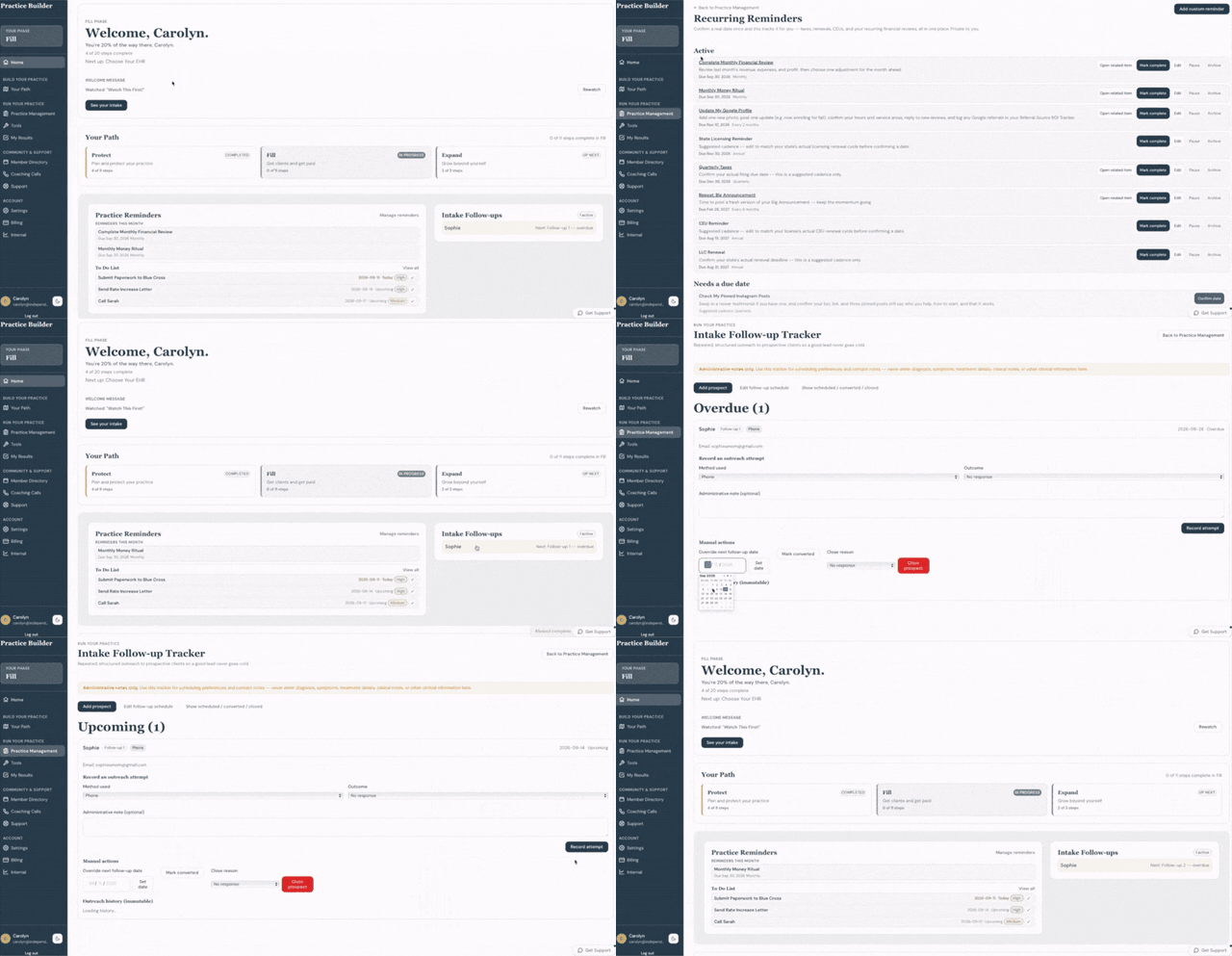
Your home screen shows what is due this month, your to do list, and every family still waiting to hear back from you.
The wizard walks you through everything your practice needs to be set up correctly, including the rules and regulations for the state where you practice. If you started years ago, it shows you what you skipped. Then reminders keep your renewals and your license from lapsing.
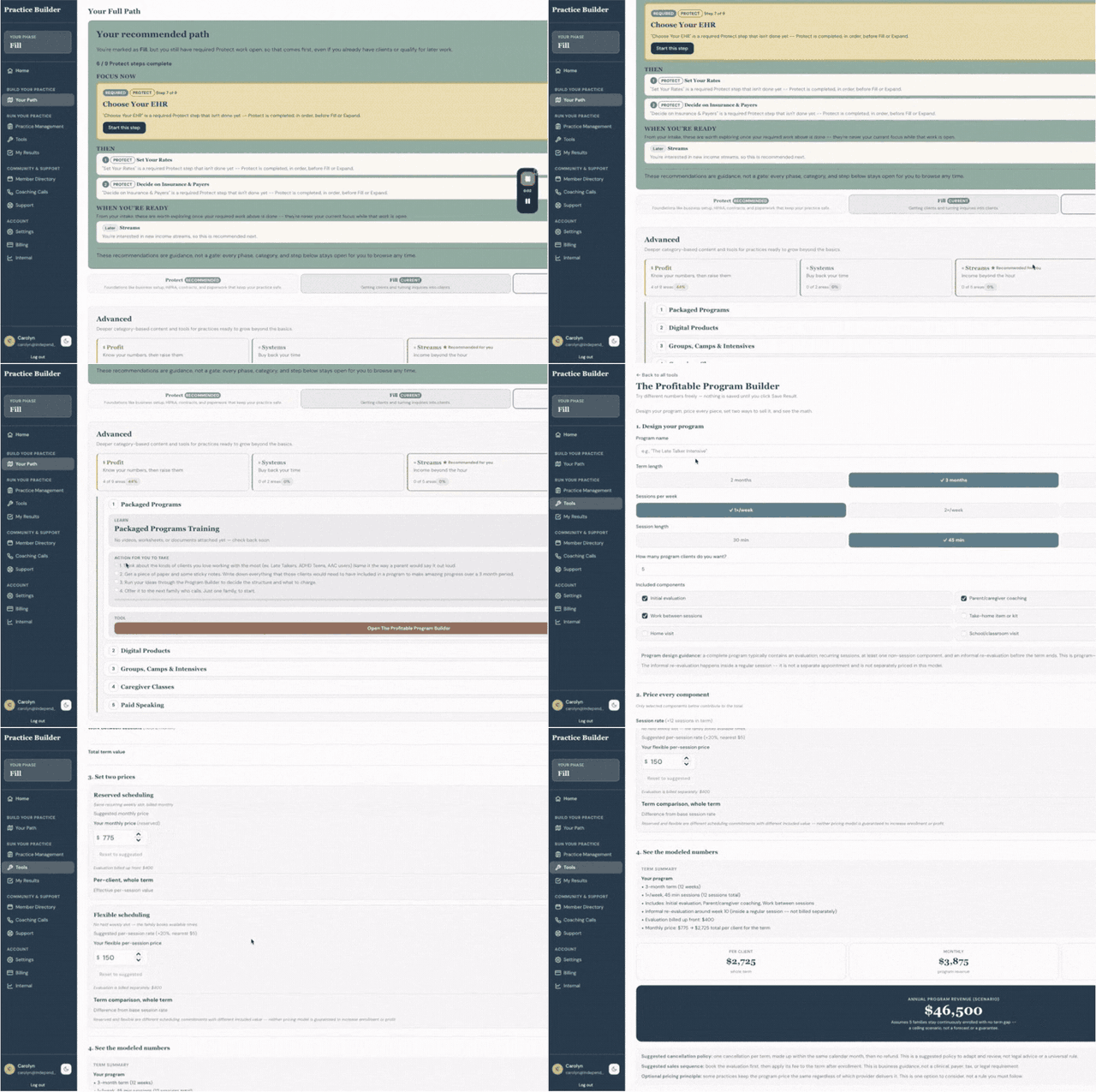
Packaged programs, school and facility contracts, groups, camps, caregiver classes, paid speaking, digital products. Pick one and Practice Builder prices it, packages it, and shows you what it would add to your year before you build a thing.
First the math. Whether you are ready, whether the person is an employee or a contractor, and what your collected rate can actually carry. Then the whole process, including the pay rate, the job listing, the ad for it, your interview questions, and their first week.
Revenue, profit, caseload, attendance, and where every client came from. It updates as you go, with no spreadsheet to maintain and no monthly task you keep moving to next week. Open one screen and know exactly where you stand.
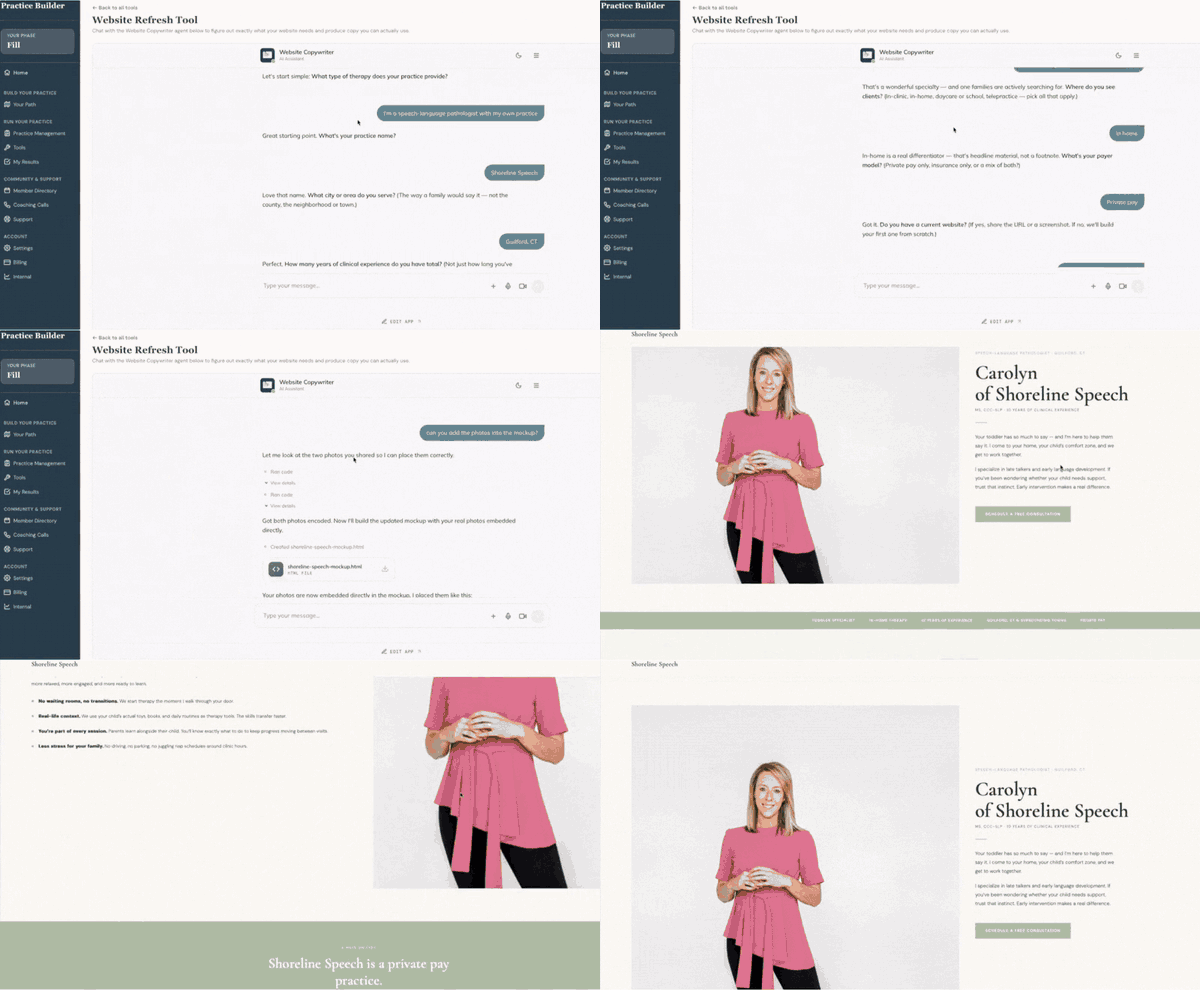
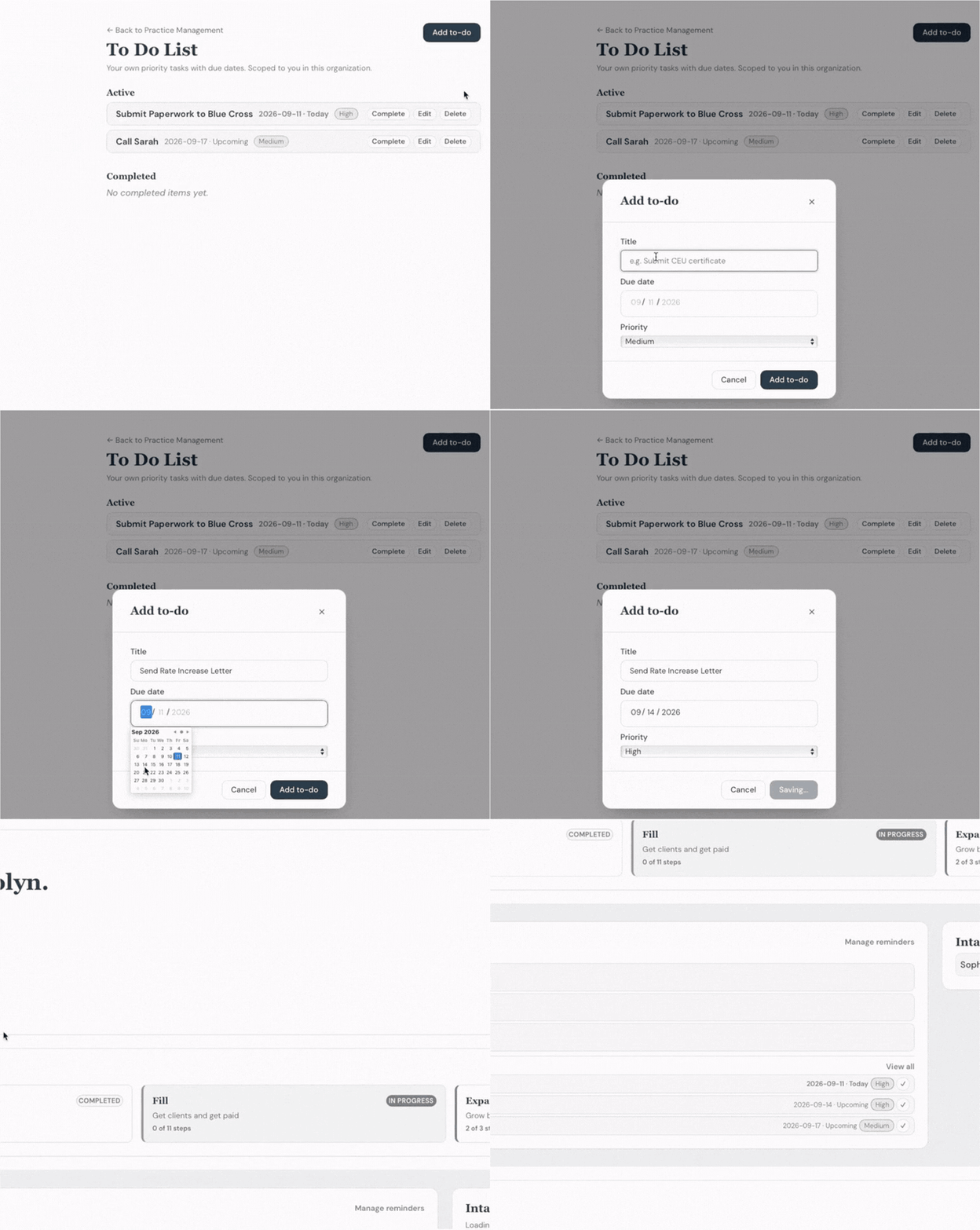
These are real screens from inside Practice Builder. Pick a tool and watch it run.
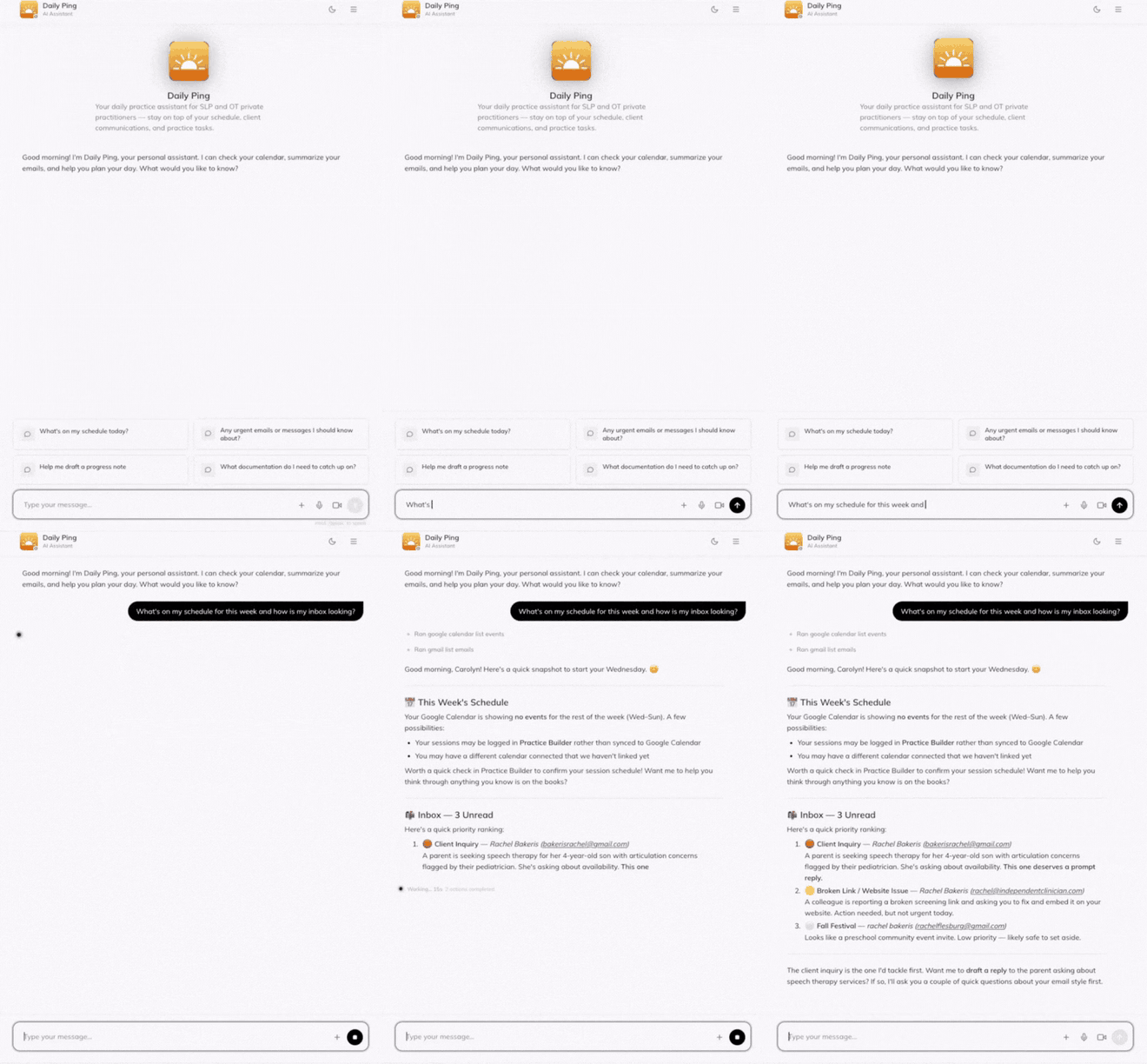
Ask what is on your schedule this week, and Daily Ping checks your calendar, sorts your inbox, and tells you which message needs a reply first.
What you are watching
Add a task like sending your rate increase letter, give it a due date and a priority, and it shows up on your home screen. It stops living on a sticky note and starts getting done.
What you are watching
Your Path shows you what to do first and what comes next. When you are ready for a new income stream, it takes you to the Profitable Program Builder, where you choose the length, the sessions and the components and see what the program could bring in.
What you are watching
Practice Builder reads your practice and puts a single next move at the top of your screen, so you always know where to start today.
You answer questions about your rates, payors, caseload, and team once. Every tool after that already knows, so you are never entering the same thing twice.
Short videos sit beside the tools where it helps to have extra context or support, so the teaching is there when you want it and out of your way when you do not.
Every week I get on a call with Practice Builder members for an hour. Bring a question about a tool, a number you cannot make sense of, or the step you are on and cannot finish.
This is the most live access I have ever given in a group setting. You also get a live onboarding call with the Practice Builder team when you join, so you start with help rather than a blank screen.

Natalie found out a nearby practice had a $90 per session insurance contract. Hers was $29. She is now using the Insurance Negotiation Tool to ask for more.
Julia renamed her private pay program, and now parents are signing up.
She also decided to skip a $6,000 certification that would not have brought her clients.
Kayla used the Rate Increase Calculator and Letter Generator to raise her rates and earn more.
Every practice is different, and these are not promises of what yours will do. They are what came up on one week's call, and they show what is possible when one good business decision gets made.
Practice Builder is live and it works. It is also not finished.
New tools go in every week, and we are taking feature requests from the practice owners using it now. Some of what you see in your first month will change because of something a member said on a call.
Here is the trade you are making. You get an hour with me every week while the group is small, and you get a say in what gets built next.
If you would rather wait for a finished product, you can wait. Everything it already does, it does today.
Not a tour, and not a limited version. You get Practice Builder, the weekly hour with me, and a live onboarding call with the Practice Builder team, from the day you join.
You get a live onboarding call with the Practice Builder team, so your first week goes into using the software rather than working out where to begin.
Take the Private Practice Intake Form, and Practice Builder builds your Path from your answers and puts your first step at the top of your screen.
Run a calculator on your real payors, have it write your website copy, set your reminders, and bring whatever you get stuck on to the weekly hour with me.
Most practice owners either pay for these one at a time, or go without them and carry the work themselves. Here is what hiring each one out runs.
Your first 7 days are free. Practice Builder, plus the weekly hour with me, at whichever price works best for you.
Your first 7 days are free, so you can go in and use it before you pay for anything. Your price stays the same for as long as you stay enrolled. Everything is included, with no upsells and no add ons. You can cancel any time by emailing [email protected], and payments already made are not refunded.
That is about $38 a week for the software and an hour with me every week.
One rate increase covers the cost of the whole year. So does one payor renegotiated, or one packaged program sold to one family. Waiting another month costs you more than joining does.
Get my first 7 days freeIf yours isn't here, email me and I'll answer it myself.
No. Your EMR manages your clients, your notes, your scheduling and your claims. Practice Builder manages your practice. You keep both.
Not one to one. The weekly call is one hour with a group of members, every week. Practice Builder is the software plus that weekly hour with me.
Yes. It is worth knowing what that means here, though. Practice Builder is not where your client records live. Your EMR holds protected health information. Practice Builder holds information about your practice, your numbers, your payors and your team.
Yes. Your Path starts with legal setup and walks you through getting your practice set up correctly, in order, including the rules where you practice.
Your Path skips what you have already done. Most established owners spend their time in the profit and systems tools, working on rates, payor mix, income streams and hiring.
Every call is recorded and posted inside Practice Builder, so you can watch it whenever your day allows.
Yes. It is $197 a month. Paying for the year is $1,997, which works out $367 less than paying month to month.
Yes. Your first 7 days are free. Take the intake form, get your Path, use the tools on your own numbers, and come to the weekly call, all before you pay for anything.
Yes. You get a live onboarding call with the Practice Builder team, where they walk you through your start and answer whatever comes up. After that, the weekly hour with me is there every week.
No. The price you join at stays the same for as long as you stay enrolled.
Yes. Email [email protected] and we will take care of it. Payments already made are not refunded, and your access runs to the end of the period you have paid for.
Software and training for your practice are normally deductible business expenses. Your accountant knows your situation, so ask them, but yes, this is a business expense.
Whether we have worked together before or you have been reading my emails for years without ever buying anything, I would love to help you take your practice from where it is now to where you want it to be.
However messy it feels right now, there is no judgement here. I have seen behind the scenes of thousands of practices and I know what works and what does not.
Let's do this, together.
- Jena